The Image Simulator
Overview
The image simulator (the nav.sim package) renders synthetic spacecraft
frames – stars, planetary bodies, and rings, with a realistic detector model –
from operator-supplied geometry rather than from SPICE. It exists to test and
validate the navigation pipeline, not as an end-user product: because every
simulated frame’s true pointing offset is known by construction, a simulated
image is the only frame whose navigation answer can be checked exactly. The
simulator drives the algorithmic-invariant tests, the regression baselines, the
single-variable sensitivity sweeps, and the sensitivity report
(Simulator Performance and Sensitivity Report).
The simulator has three equally valid entry points (the “three peers”):
the Python API (
nav.sim.render.render_combined_model()and the per-feature renderers),the YAML scene catalog under
tests/integration/sim_scenes/(validated bynav.sim.scene), which is the durable test artifact, andthe GUI
nav_create_simulated_image, an interactive editor for the same parameters.
Every parameter is reachable from all three; adding a physical effect means
adding it to the renderer, the scene schema, and a GUI control together. The
navigator side – how a simulated frame is turned into NavFeature objects and
navigated – is documented in the simulated-model chapters
(Simulated Body Navigation Model,
Simulated Ring Navigation Model,
Simulated Star Navigation Model); this chapter documents the
rendering side and the scene formats.
What can be simulated
A scene is composed from these ingredients, each independently optional:
Ellipsoidal bodies – a triaxial ellipsoid with Lambertian shading at a chosen illumination azimuth and phase angle, optional in-plane rotation and tilt, and optional procedurally generated craters.
Irregular (polyhedral-mesh) bodies – a procedurally generated lumpy mesh at a chosen three-axis pose, for non-ellipsoidal shapes (Hyperion-like, Phoebe-like). See Body parameters.
Planetary rings – bright ringlets and dark gaps with elliptical (mode-1, eccentric) edges and per-edge anti-aliased shading.
Stars – an explicit list of stars at chosen positions and magnitudes, and a procedurally generated field of random background stars.
A camera-roll and pointing offset – the planted ground truth the navigator must recover: a sub-pixel
(dv, du)translation and a boresight roll.A realistic detector model – Poisson shot noise, Gaussian read noise, a bias pedestal, cosmic-ray spikes, missing-data markers, full-well saturation with optional column bloom, and a per-instrument PSF – all keyed to the emulated instrument’s configuration.
A stray-light gradient – a linear brightness ramp or a radial flare bump, to exercise the source-image background filter.
Per-instrument coupling means a simulated “Cassini ISS NAC raw” frame goes
through the same noise sigma, signal scale, saturation, marker value, and PSF as
a real CISS NAC raw frame; the emulated instrument is chosen by the
instrument field (see Instruments).
Scene ingredients
The panels below are rendered by python -m tests.integration.sim_doc_images
(see Exporting viewable PNGs); each isolates one ingredient.
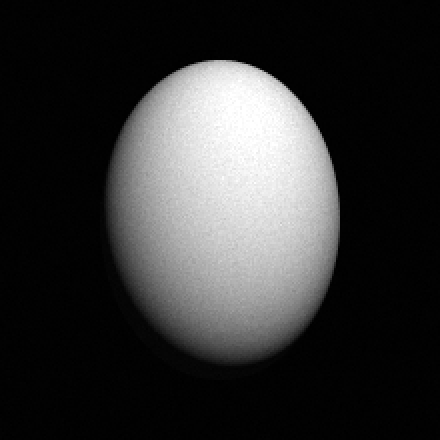
Ellipsoidal body (Lambertian, moderate phase). axis1 is the vertical
extent, axis2 the horizontal.
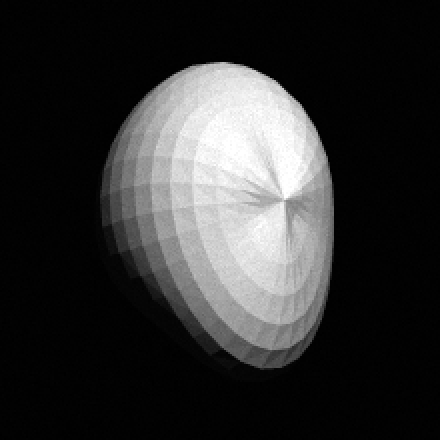
Irregular polyhedral-mesh body of the same axes at a three-axis pose.
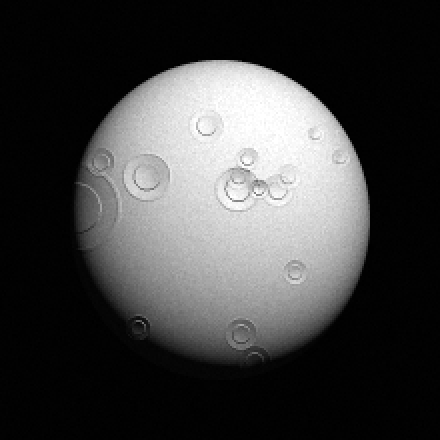
Ellipsoid with procedurally generated craters.
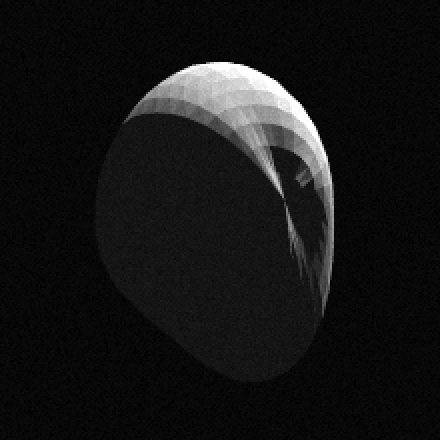
High-phase (130 deg) mesh body rendered as a thin lit crescent.

Two eccentric ringlets with a gap between them.
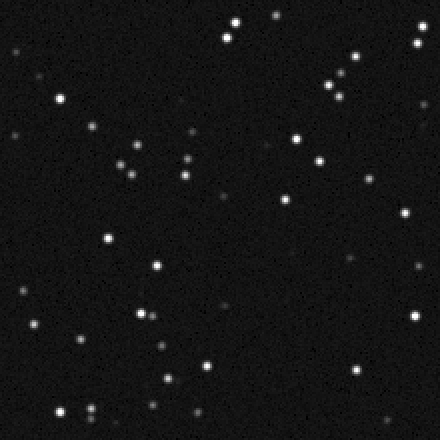
A random background star field.
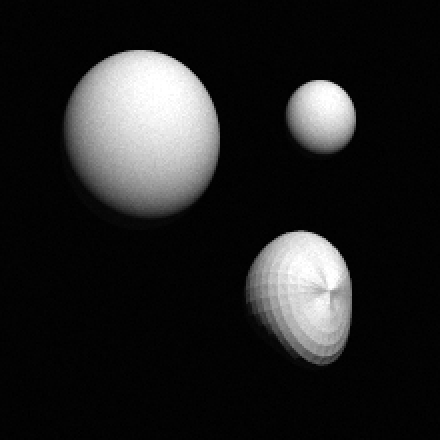
Multiple bodies (ellipsoid and mesh) at different sizes, depth-ordered by
range.
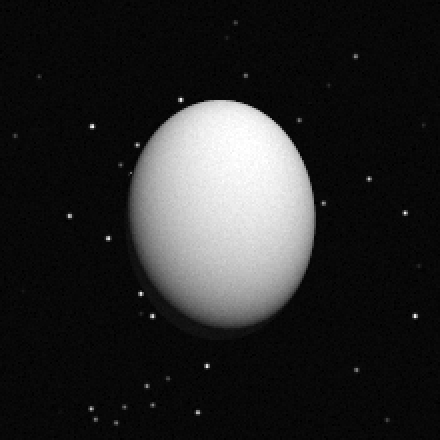
A body against a background star field.
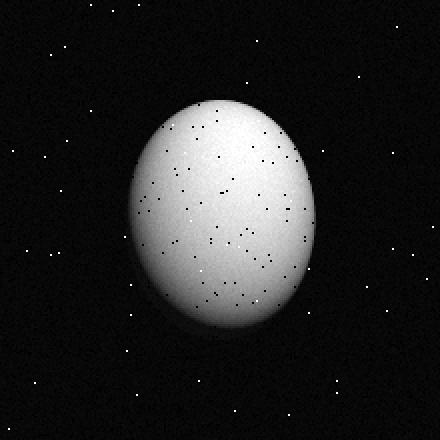
Detector model: read + shot noise, sparse cosmic-ray spikes (bright) and missing-data dropouts (dark).
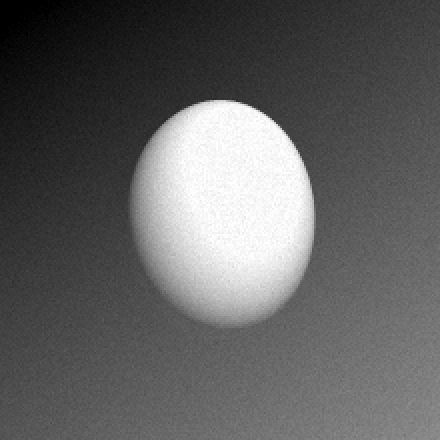
A linear stray-light gradient behind a body.
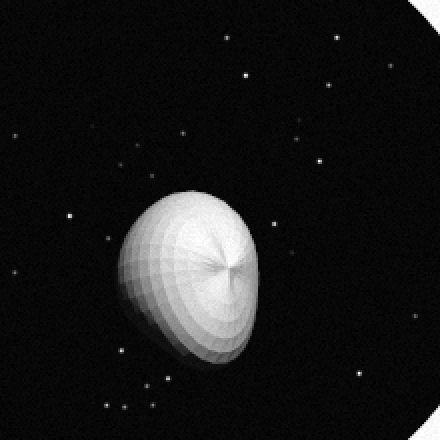
A composite frame: a mesh moon, a ring, and a star field.
The render pipeline
nav.sim.render.render_combined_model() takes a sim_params dict and
returns (image, metadata). It composes the frame in a fixed order so each
later stage sees the accumulated signal: background stars, then the explicit
star list, then bodies and rings (depth-sorted far-to-near by their range),
then the noise-free stray-light gradient, then the detector model (signal
scaling, Poisson shot noise, Gaussian read noise, bias pedestal, cosmic rays,
missing-data markers, and saturation with optional bloom). The output is an array
of detector counts (DN).
Determinism. Every random effect draws from a per-effect sub-seed derived
from the scene’s random_seed (nav.sim.seeds), so the same scene
renders byte-identically, and adding a new randomized effect does not perturb the
output of existing ones. Crater placement uses a stable hash of the body’s
geometry when the body gives no explicit seed.
Instruments. The instrument field selects which per-instrument
configuration block drives the detector model and PSF
(nav.sim.instruments). The recognized names are coiss_nac,
coiss_wac, coiss_calib_nac, coiss_calib_wac, gossi, nhlorri,
and vgiss, plus generic (alias sim) for the instrument-agnostic
defaults. Calibrated (*_calib_*) instruments are in I/F units with a NaN
missing-data marker and no full-well; raw instruments are in DN with a 0 marker.
A scene can pin or override individual instrument settings with
instrument_config (see Instrument-config overrides).
Scene format
A scene is a single YAML file whose fields are the flat runtime sim_params
names the renderer consumes, so a validated scene file is the sim_params
dict with no translation layer.
The scene catalog (nav.sim.scene) is the durable test artifact, laid out
as tests/integration/sim_scenes/<scene_class>/<scene_name>.yaml (the
directory is the registry). nav.sim.scene.load_sim_scene() parses and
validates a file and returns the flat sim_params dict the renderer consumes;
the GUI’s “Save Scene (YAML)” / “Load Scene (YAML)” buttons read and write the
same format via nav.sim.scene.save_sim_scene(). The scene classes (for
example algorithmic_invariants, phase_sweep_regular_body,
phase_sweep_irregular_body, range_sweep, noise_sweep,
multi_body_geometry, regression) scope what each scene is testing and are
enforced by the structural test. The scene README at
tests/integration/sim_scenes/README.txt documents the schema alongside the
code.
A complete YAML scene – a noisy Cassini NAC frame with one irregular mesh body, a ring, a couple of stars, and a planted offset the navigator must recover – reads:
schema_version: 1
scene_name: example_scene
instrument: coiss_nac
size_v: 220
size_u: 220
random_seed: 42
exposure_sec: 1.0
bodies:
  - name: HYPERION
    shape_model: polyhedral_mesh
    mesh_lumpiness: 0.4
    mesh_seed: 7
    pose_euler_deg: [10.0, 35.0, 0.0]
    center_v: 110.0
    center_u: 110.0
    axis1: 150.0
    axis2: 110.0
    axis3: 95.0
    illumination_angle: 25.0
    phase_angle: 40.0
rings:
  - name: RINGLET
    feature_type: RINGLET
    center_v: 110.0
    center_u: 110.0
    inner_data: [{mode: 1, a: 90.0, ae: 6.0}]
    outer_data: [{mode: 1, a: 98.0, ae: 6.0}]
    shading_distance: 10.0
    range: 1000.0
background_stars_num: 40
stars:
  - {name: S1, v: 30.0, u: 60.0, vmag: 6.0}
  - {name: S2, v: 180.0, u: 150.0, vmag: 7.5}
noise:
  poisson: true
  read_noise_dn: 4.0
offset_v: 1.43
offset_u: -0.61
The schema_version and scene_name keys are metadata the renderer
ignores; scene_name must equal the filename stem. Every other key is a flat
sim_params field consumed directly by the renderer.
Scene parameter reference
Top-level fields
Field |
Type |
Default |
Meaning |
|---|---|---|---|
|
int |
required |
Image height and width in pixels. |
|
str |
|
Emulated instrument; selects the detector model and PSF (see Instruments). |
|
int |
42 |
Scene seed; per-effect sub-seeds derive from it. |
|
float |
1.0 |
Exposure time; scales the cosmic-ray count. |
|
float |
0.0 |
Planted pointing offset (px) applied to all bodies, rings, and stars. |
|
float |
0.0 |
Planted boresight roll (deg) applied about the image center. |
|
list |
|
Per-body parameter dicts (see Body parameters). |
|
list |
|
Per-ring parameter dicts (see Ring parameters). |
|
list |
|
Explicit star dicts (see Star parameters). |
|
int |
0 |
Random background-star count (0-1000). |
|
dict |
instrument |
Detector-noise block (see Detector-noise block). |
|
dict |
off |
Stray-light block (see Stray-light block). |
|
dict |
none |
Per-instrument config overrides (see Instrument-config overrides). |
Body parameters
Each entry of bodies is a dict. Common fields:
Field |
Type |
Default |
Meaning |
|---|---|---|---|
|
str |
generated |
Body label used in metadata and annotations. |
|
float |
frame center |
Body center in pixels. |
|
float |
0.0 |
Full extents of the three body axes in pixels ( |
|
float (deg) |
0.0 |
Image-plane light azimuth (0 = from the top). |
|
float (deg) |
0.0 |
Phase angle (0 = fully lit, 180 = back-lit crescent). |
|
float |
body index |
Depth-ordering key; smaller renders in front. |
|
str |
|
|
Ellipsoid bodies add rotation_z and rotation_tilt (degrees), the crater
controls crater_fill, crater_min_radius, crater_max_radius,
crater_power_law_exponent, crater_relief_scale, and an optional crater
seed. Mesh bodies (shape_model: polyhedral_mesh) instead read:
Field |
Type |
Default |
Meaning |
|---|---|---|---|
|
float |
0.3 |
Surface relief amplitude as a fraction of the unit radius. |
|
int |
0 |
Seed selecting which irregular shape is generated. |
|
int |
16 / 32 |
Mesh latitude bands and longitude divisions. |
|
[float, float, float] |
|
Body orientation as intrinsic X, Y, Z Euler angles (degrees). |
|
dict |
none |
Overlay applied to the predicted body only, diverging the navigation geometry from the rendered one (see below). |
Note
Axis convention. Both renderers use the same mapping: axis1 is the
vertical (v) extent and axis2 the horizontal (u) extent. An
ellipsoid and a mesh declared with identical axis1/axis2 are oriented
the same way, so the two are interchangeable for the same geometry.
Render geometry vs navigation geometry. By default the navigator predicts the
body from the same parameters the renderer drew, so it knows the truth. A body
may carry an optional nav_override mapping that is overlaid on the predicted
body only – the renderer ignores it and always draws the true geometry. This
separates the render geometry (ground truth) from the navigation geometry
(what the navigator assumes), the channel the irregular-body scenarios use to
render a lumpy mesh but predict its smooth (ellipsoidal) limit, or to predict the
same body at a disagreeing pose. The override never moves the center, so the
planted offset is still recoverable. See
Simulated Body Navigation Model.
Ring parameters
Each entry of rings is a dict with name, a feature_type of
RINGLET (adds brightness) or GAP (subtracts it), a center_v /
center_u, a shading_distance (edge-fade width in pixels), a range
depth key, and inner_data / outer_data edge lists. At least one edge is
required. Each edge is a list of mode dicts; the required mode-1 dict carries the
elliptical orbit: a (semi-major axis, px), ae (eccentricity times a,
px), long_peri (longitude of pericenter, deg), and rate_peri (precession
rate, deg/day, applied across time minus ring_epoch).
Star parameters
Each entry of stars is a dict with name, a v / u position, a
vmag (visual magnitude; lower is brighter), a psf_sigma, and an optional
spectral_class. Random background stars are added by setting
background_stars_num; their PSF sigma and brightness power-law are configured
by background_stars_psf_sigma and
background_stars_distribution_exponent. Stars are rendered with a half-pixel
PSF-evaluation offset so a star’s brightness centroid lands exactly at its
predicted (v, u), which keeps star navigation free of a constant half-pixel
bias.
Detector-noise block
The optional noise dict overrides the emulated instrument’s detector
defaults:
Field |
Type |
Default |
Meaning |
|---|---|---|---|
|
bool |
True |
Apply Poisson shot noise to the signal. |
|
float |
instrument |
Gaussian read-noise sigma in DN. |
|
float |
instrument |
Additive bias pedestal; lifts dark sky off zero so it is not confused with the missing-data marker. |
|
float |
0.0 |
Cosmic-ray fluence (events / cm^2 / sec), scaled by |
|
float |
0.0 |
Fraction of pixels (0-1) set to the missing-data marker. |
Saturation clips at the instrument’s full-well DN after noise; cameras with
documented column bloom can carry a bloom_length that spreads saturated
excess along the column.
Stray-light block
The optional stray_light dict adds a background contribution before the
detector model: amplitude (peak fraction of full scale; 0 disables it),
direction_deg (ramp direction for the linear model), and model
(linear ramp or radial bump). It exercises the navigator’s source-image
background filter.
Instrument-config overrides
The optional instrument_config dict is deep-merged over the resolved
per-instrument block, so a scene can pin individual settings (PSF sigma, noise,
data units, extfov margin) without tracking later camera-config edits. Omit it to
inherit everything; name generic and override everything to fully
self-specify. The top-level noise block still wins over
instrument_config.noise for rendering. See Observations.
The simulated-image GUI
nav_create_simulated_image is a PyQt6 editor for the same parameters, with a
live preview. Launch it with:
nav_create_simulated_image
The GUI exposes the full scene parameter surface, so any scene that can be
written by hand in YAML can also be built in the GUI. The General tab carries
the image size, the planted offset and camera roll, the exposure time, the seed,
the instrument selector, the camera-rotation-fit override and midtime, the
detector-noise panel (Poisson, read noise, bias, bloom, signal full-scale,
pixel area, cosmic-ray rate, missing-data rate), the stray-light panel
(amplitude, direction, model, radial centre), a PSF preview, a saturation overlay
toggle, the closest-planet selector and ring times, and the background-star
controls. Each per-body tab carries that body’s geometry, a shape-model
dropdown (ellipsoid or mesh) with the mesh lumpiness / seed / resolution / pose
controls, the crater controls and crater seed, an optional physical scale, and a
navigation-override group (the predicted geometry that diverges from the rendered
one). Each per-star tab carries the star’s position, magnitude, PSF, smear
vector, and catalog label; each per-ring tab carries the ring’s edges and
shading. The parameters the GUI does not edit are the nested
instrument_config overrides, multi-mode ring edges (the renderer reads only
mode 1), and the absolute signal_full_scale_dn alias (its fractional form is
exposed instead). Scenes round-trip through the Load / Save Scene (YAML)
buttons, so a scene rendered in the GUI can be saved as a catalog artifact and a
catalog scene can be loaded back to edit. The GUI is one peer, not the sole
control surface; the YAML and the Python API are equally authoritative.
Exporting viewable PNGs
The renderer emits detector counts whose absolute range depends on the instrument
and on cosmic-ray spikes, so nav.sim.png_export stretches a DN image to a
viewable grayscale PNG with a percentile clip (a few hot pixels do not crush the
signal) and an optional gamma that lifts dim features such as a crescent or a
faint star field:
from nav.sim.png_export import render_scene_png
render_scene_png(sim_params, 'frame.png', gamma=1.4, upscale=2)
Two tools build on it. The sweep runner can dump every frame behind a response curve for inspection:
python -m tests.integration.sim_sweep_runner --dump-images out/ --only phase_regular_body
writes one PNG per sweep step under out/<sweep_name>/. The documentation-image
generator rebuilds the galleries in this chapter and the scene images in the
sensitivity report:
python -m tests.integration.sim_doc_images
Both galleries carry a NOTES.md describing how to regenerate them after a
rendering change.
See also
Simulated Body Navigation Model, Simulated Ring Navigation Model, Simulated Star Navigation Model – the navigator side.
Testing – the test kinds the simulator drives.
Simulator Performance and Sensitivity Report – the sensitivity and algorithmic-invariant results.
API reference: nav.sim.